
Eating like a race?
Try SlowEat - Your mindful eating coach.
The all-in-one mindful eating tool for iPhone, iPad, and Apple Watch. Find your eating rhythm through AR smart detection or vibration pacing, with iCloud real-time sync.
The Dangers of Eating Too Fast: Do you face these issues?
Indigestion
Bloating, acid reflux, and discomfort. Long-term fast eating leads to insufficient chewing, placing a huge burden on your stomach.
Overeating
The brain's "I'm full" signal is delayed by about 20 minutes. By the time you feel full, you've already eaten too much.
Weight Gain
Eating too fast directly leads to excess calorie intake. It's a hidden killer for many weight loss failures.
Why did we build a mindful eating app?
Once I ate so fast that the hot food burned my chest, and it hurt all night. That's when I thought: Is there something that can remind me to slow down while eating?
Core Features: AR Detection & Vibration Pacing
AR Smart Detection
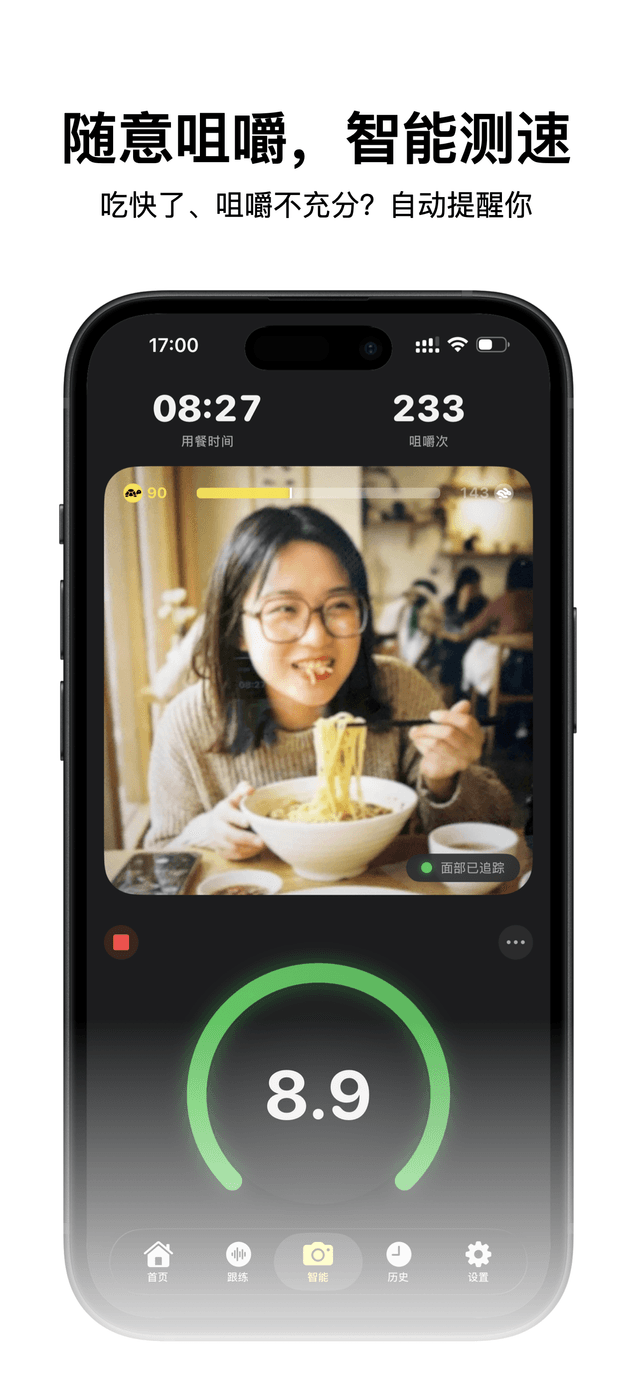
Exclusive face tracking technology detects chewing actions in real-time. New 'Swallow Speed Test' for more freedom.
Hungry Wolf Mode
A humane grace period for starting a meal. Eat freely for a set time, then the countdown begins for monitoring.
iPad & iCloud
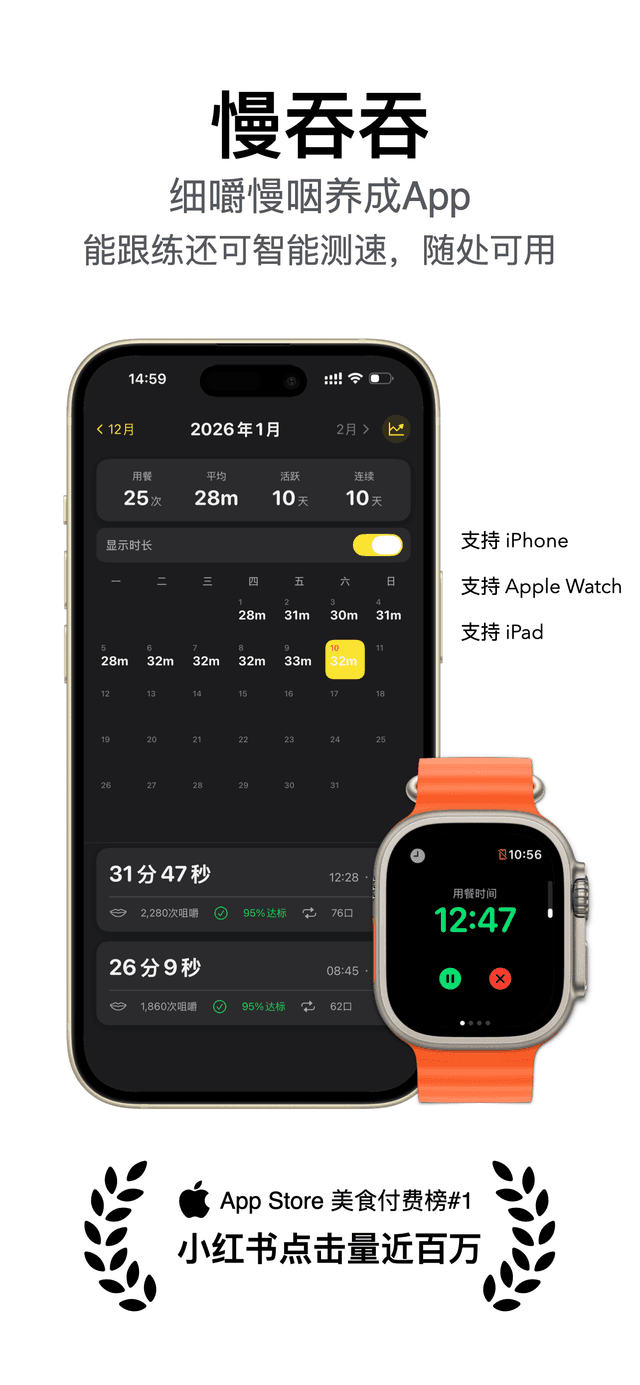
Optimized layout for iPad's large screen, supports automatic iCloud sync for seamless multi-device records.
Various Haptics
Supports single, bite, and alternating side vibrations. Series 9/Ultra 2 and above support Double Tap gestures.
Trend Heatmap
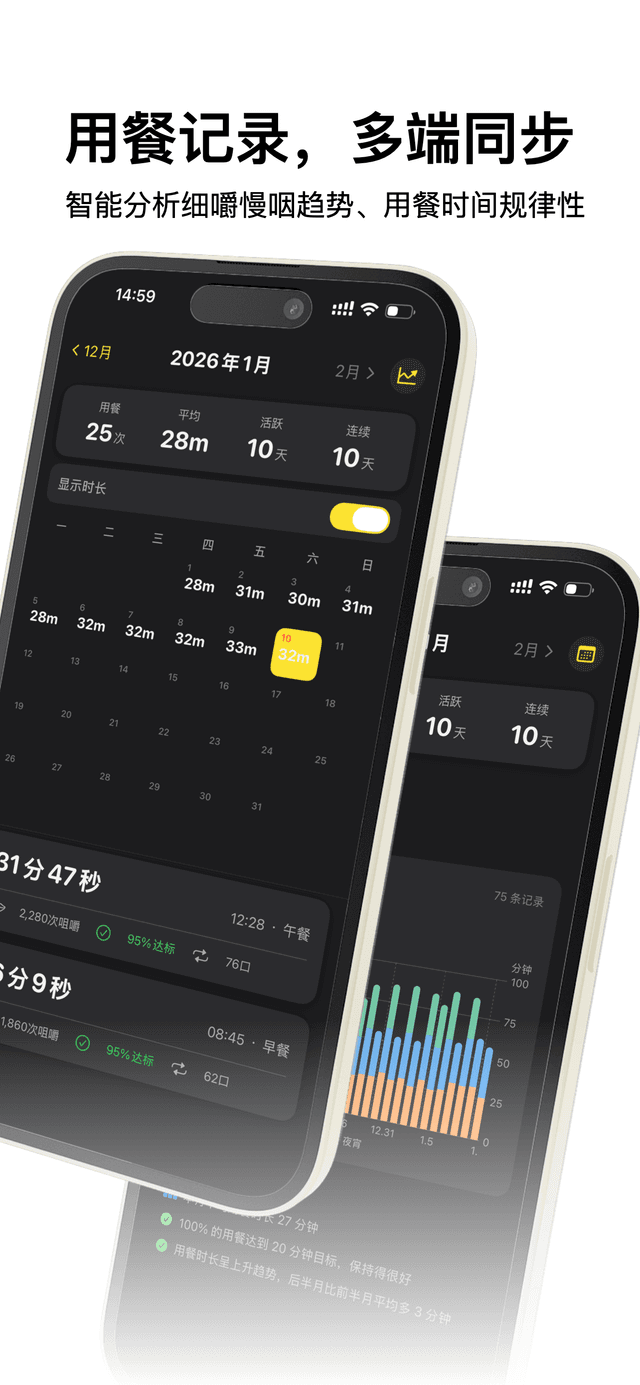
History records upgraded to a calendar heatmap. Supports weekly/monthly/yearly trend statistics, making progress clearly visible.
Privacy Preview
Supports closing the camera preview during detection, so you can enjoy SlowEat comfortably in public places like restaurants.
App Preview
Two Modes: Watch Pacing & Camera Tracking
Watch Pacing for public spaces, Camera Tracking for solo dining
Pacing Mode
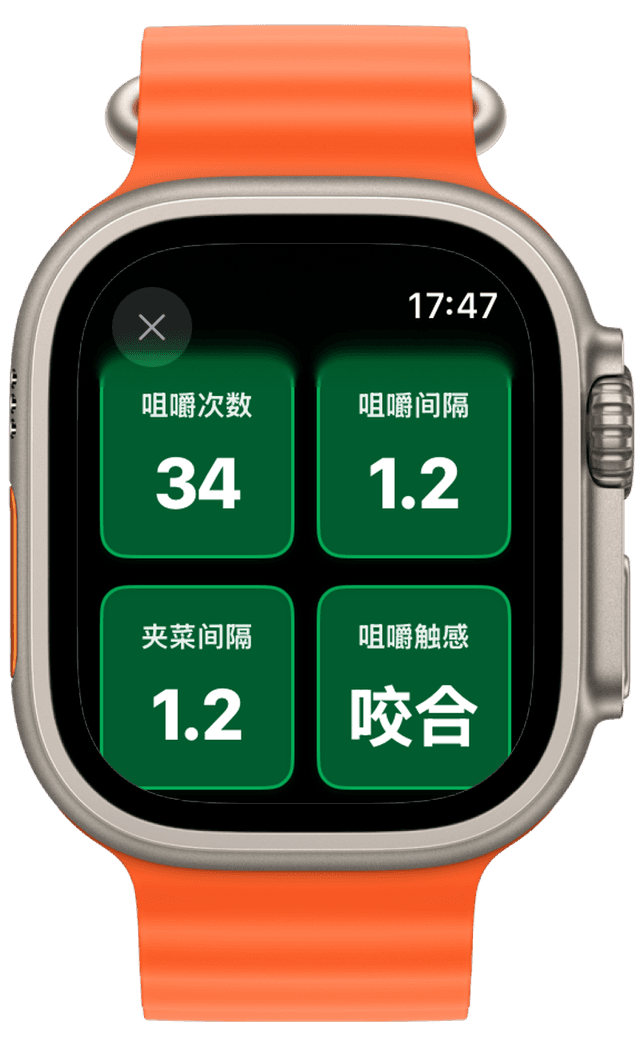
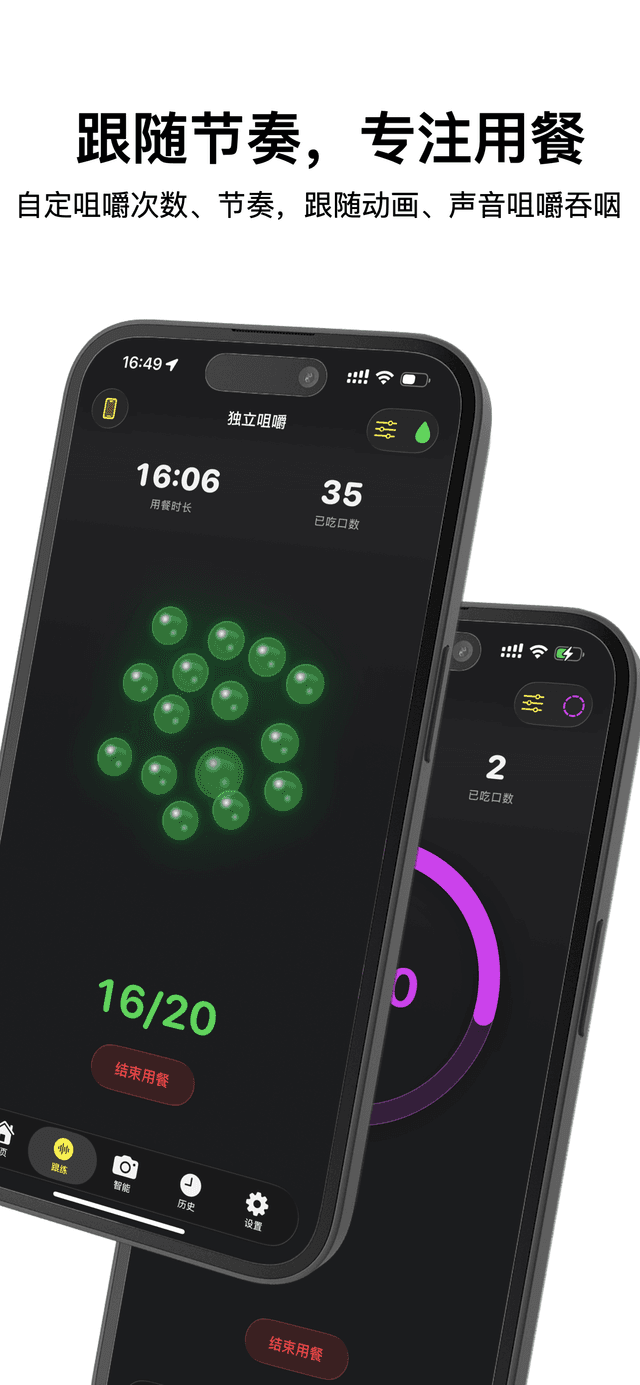
Chew with the vibration rhythm, private and elegant
Set Chew Count
Set target chews per bite, 20-30 recommended
Adjust Interval
Set the interval between chews according to personal habit
Set Break Time
Pause time between bites for picking up food and resting
Eat with Vibration
Start pacing, follow the watch vibration to chew. A special swallow vibration signals when the target count is reached
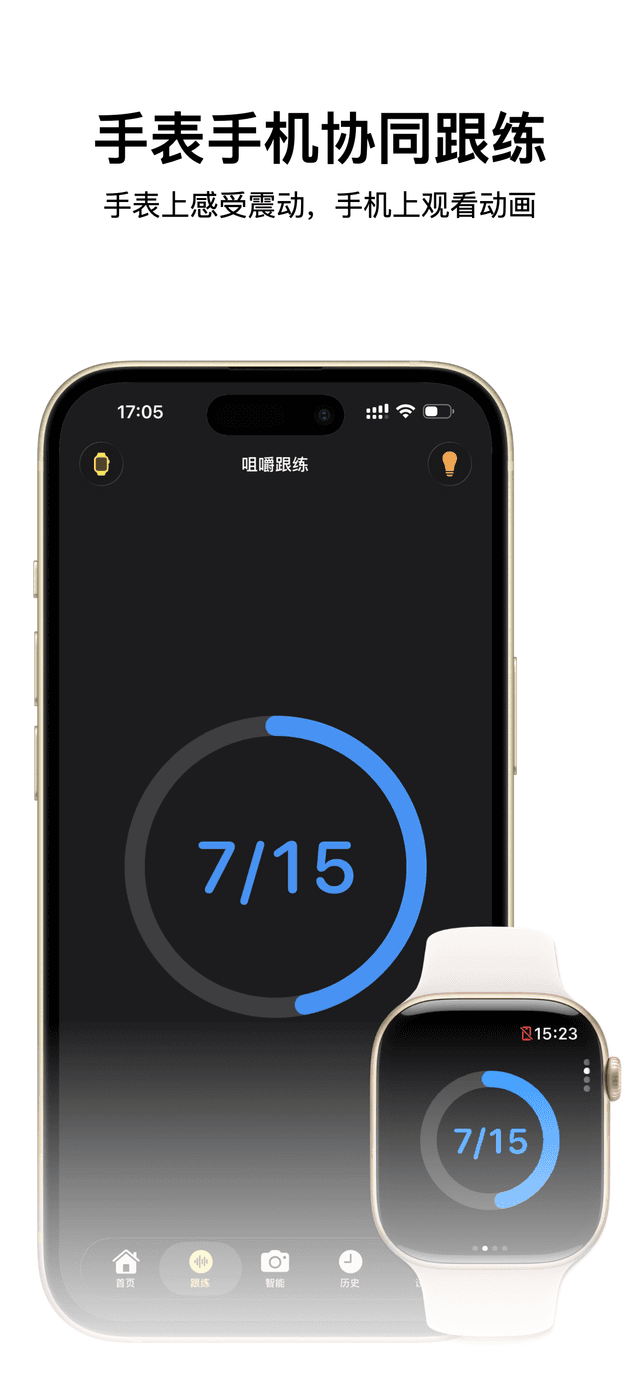
Multi-device experience: iPhone version offers various sound effects and fun pacing animations (rings, popping beads, etc.). You can also sync Watch + Phone—feel the vibration on Watch, watch the animation on Phone.
Chew Tracking
Like someone dining with you, reminding you only when fast
Set Target & Position
Set target chews per bite (e.g., 20), position phone facing you
Real-time Tracking
Automatically identifies and records every chew, no need to count distractions
Goal Alert, Free Swallow
Progress bar turns green with a sound alert when count reached; continue chewing or choose to swallow
Too Fast? Gentle Reminder
An alert reminds you if you swallow too early. Just chew more next time. Automatically starts tracking the next bite when you pick up food
"Like having a caring friend dining with you"—no need for too much distraction, stay focused on the meal itself.
Who needs this dining timer?
Why is chewing slowly so important?
Improve Digestion
Long-term fast eating leads to insufficient chewing, causing indigestion and stomach discomfort. Many who eat fast from childhood have poor digestion for this reason.
Scientific Weight Loss
Mindful Eating
Focus on chewing. Using SlowEat is like meditating with every meal. Make every meal a calm practice.
Real User Feedback
Users nickname SlowEat the "Digital Slow Bowl"
"I used to eat in 10 minutes, yesterday it took 40. Ate meat and hotpot, and still lost 0.6 lbs! Best virtual asset bought this year."
— Community Member @Peng
"Used it for lunch and dinner yesterday. Using iWatch is perfect, reminds me to chew slowly. Totally worth the price 👍"
— Community Member @momo
"Wasn't what I imagined at first, but this new mode is exactly what I wanted! Great mode 🥳 Love it."
— RedNote User @SalmonAddict
"Finally can stretch a meal to 20 or 30 minutes! Used to finish in 5, now can last 15 or more!"
— RedNote User
"Using it for weight loss, feeling fuller, really eating less. Most importantly, slimming down without dieting!"
— App Store User
"A savior for intestinal obstruction patients. Didn't expect SlowEat to help me. Stomach discomfort is much less now."
— Community Member
"Nicknamed 'Digital Slow Bowl' by many, so fitting! Like a coach supervising your slow eating."
— RedNote Comment
"Feel this app really helps with slow eating. Vibrates once, you can set chew count and time. Not an ad, I wish they paid me 😂"
— RedNote User @sober
FAQ
About Scientific Slow Eating & Healthy Habits
Extend a meal from 5 mins to 20 mins
Start Slow Eating JourneyRequires watchOS 10.0+ · Lifetime Purchase
Lab Notes
Posts documenting the usage of this product
📝 How to Eat Slower: 5 Science-Backed Methods to Control Your Eating Speed
How to eat slower? This evidence-based guide covers 5 proven methods: the utensils-down technique, chewing count method, 20-minute rule, Apple Watch haptic pacing, and mindful eating. Research shows slow eating reduces calorie intake by 15% and lowers obesity risk by 42%.
📝 Can Slow Eating Help You Lose Weight? Science Reveals How to Trick Your Brain's GLP-1 in 20 Minutes
Why is eating fast a silent killer for your fitness goals? This post explores the roles of GLP-1, PYY, and the brain's feedback loop to uncover the physiological secrets of mindful eating.
📝 Can Chewing Slowly Really Help You Lose Weight? Scientific Evidence from Top Journals Revealed!
This article explores whether chewing slowly aids weight loss, providing a science-backed affirmative answer. It explains why our brains lag behind our stomachs by 20 minutes and identifies fast eating as a major culprit for overconsumption. Citing research from 'Nature' and 'BMJ', it establishes a direct link between eating speed and weight. The piece outlines mechanisms like increased TEF and better digestion, providing a four-week action plan using the SlowEat Apple Watch app.
📝 How I Bid Farewell to 'Wolfing Down' and Weight Anxiety with an Apple Watch App: The Science and Practice of Chewing Slowly
This article tells the story of how a personal experience with indigestion inspired me to create 'SlowEat,' an Apple Watch app that guides users to chew slowly using haptic feedback. It explores the health dangers of eating too fast, such as overconsumption and increased risks of obesity and diabetes. The piece details how slow chewing scientifically aids weight loss by regulating hormones and boosting metabolism. It also introduces a unique feature to prevent unilateral chewing, which can lead to facial asymmetry and TMJ issues, positioning the app as a 'wrist-worn health coach' for a better lifestyle.