Material Camera
Shoot and File, Say Goodbye to Cluttered Albums
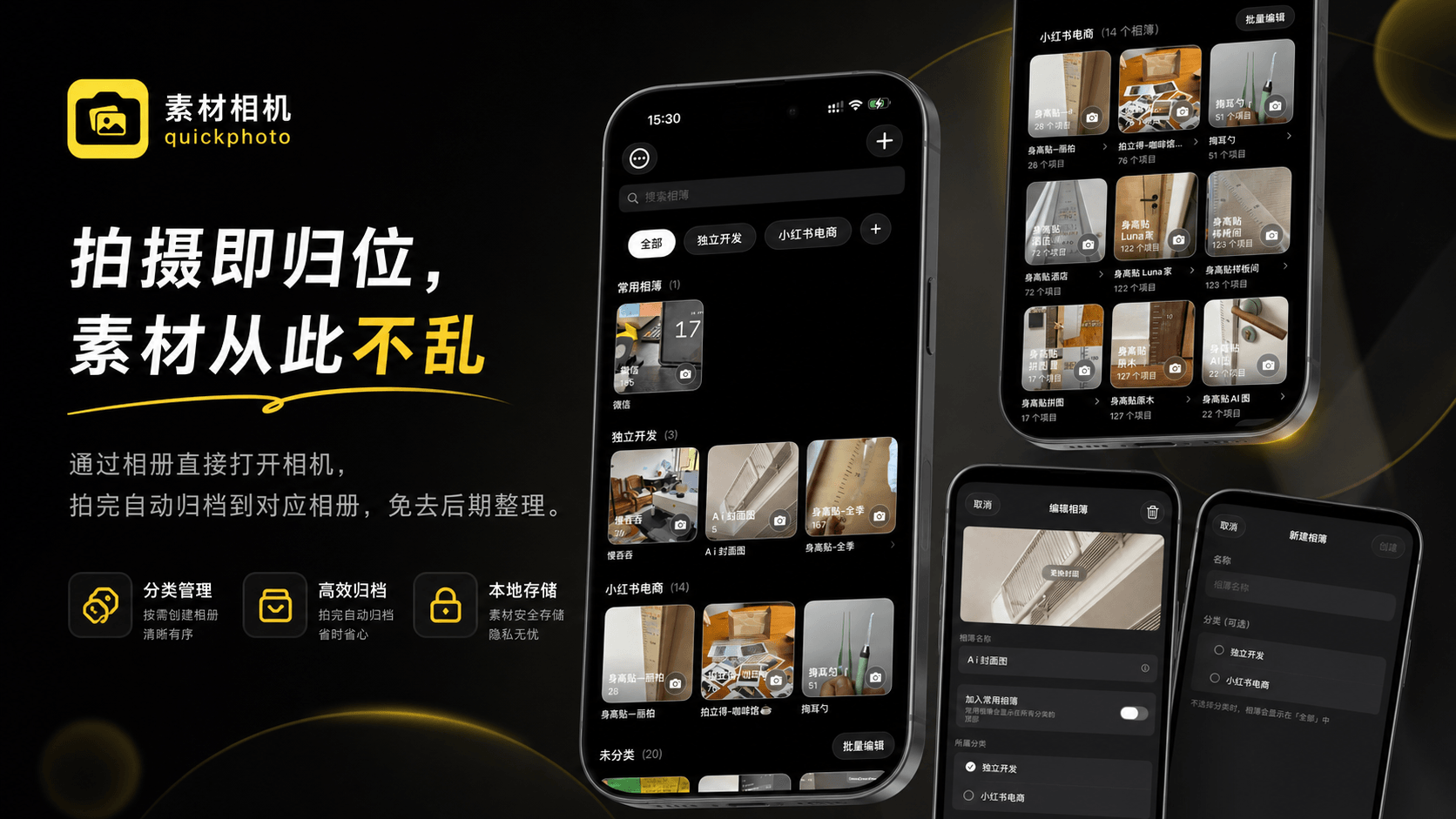
A productivity tool focused on efficient photo classification. Decide the destination before pressing the shutter, freeing you from tedious manual sorting.
iOS 16+ · Local Processing · Maximum Privacy
Who Needs Material Camera?
Whether for work records or life moments, if you have a large number of photos to categorize, it's your perfect assistant.
Professionals / Slash Careers
People who urgently need to completely separate work-related materials from personal life photos.
E-commerce Practitioners
Sellers who need to shoot multi-angle detail shots for different SKU products.
High-Frequency Recorders
Note-taking experts, renovation documenters, and bullet journal enthusiasts who need instant archiving by theme.
Product Photographers / Personal Shoppers
Professionals who need to categorize massive amounts of materials by brand or model in real-time.

Core Usage Scenarios
Seamlessly integrates into high-frequency shooting needs, bringing unprecedented order.
Isolating Work and Life Boundaries
In work mode, materials go directly into the work album without mixing into the system's main album.
E-commerce and Commercial Photography
Photos are automatically saved into the corresponding product album. No need to identify them later.
On-site Recording and Evidence Collection
Quick recording of sites. Instantly categorize by area or date to ensure organized materials.
Personal Shopping / Sourcing On-site
Quickly shoot details at mall counters, instantly archiving them by brand for easy access.
Minimalist and Elegant User Flow
Establish your album order in just a few simple steps
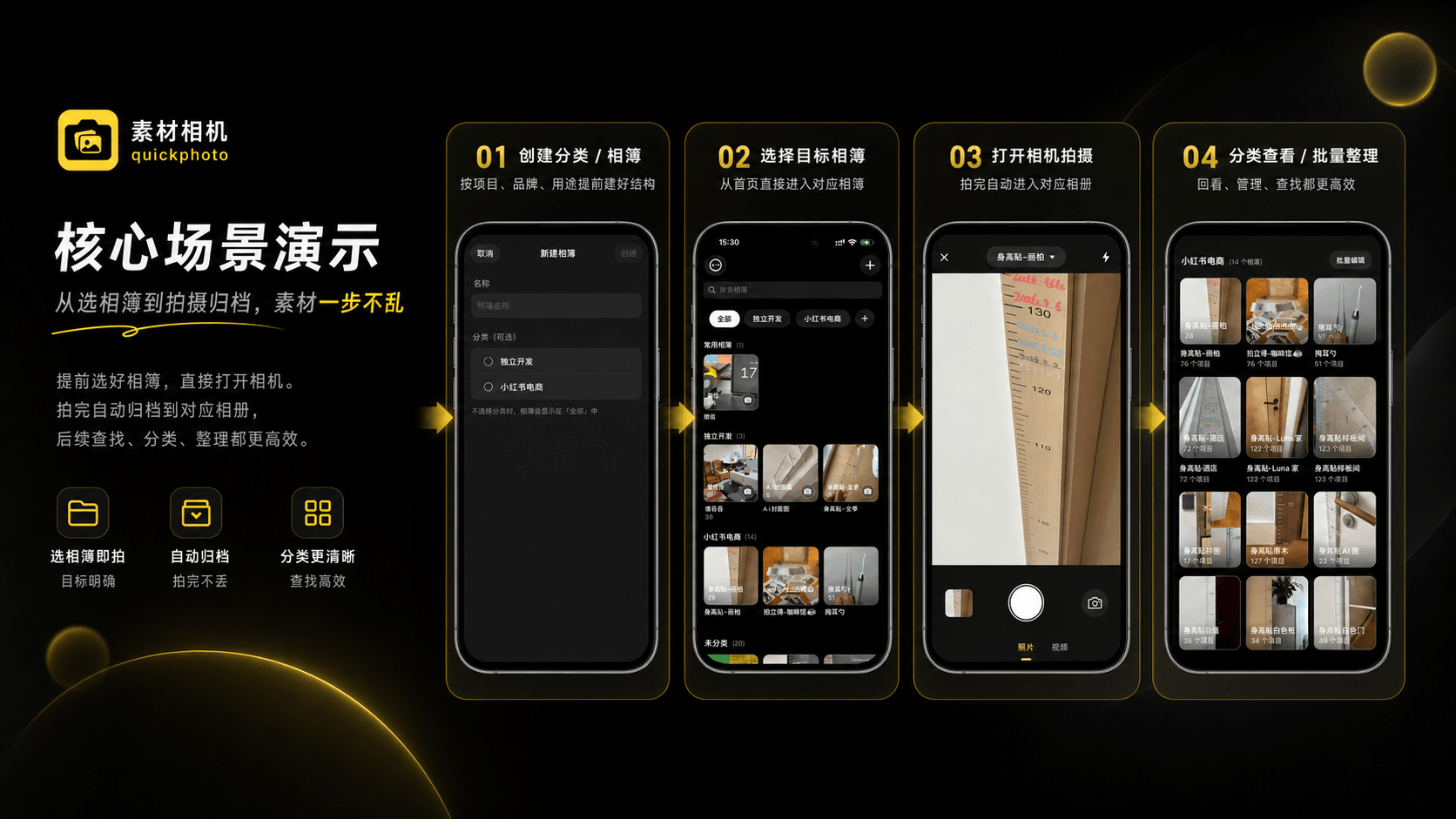
Create Exclusive Categories
Set up independent albums based on projects (e.g., [Work] Weekly Report).
One-Click Target Lock
Before shooting, click the camera icon on the target album to enter the dedicated mode.
Extreme Zero-Friction Shooting
Silent saving supports continuous shooting; preset ratios eliminate post-cropping steps.
Real-Time Review & Share
The latest thumbnail is displayed in the corner. Click to view or share details.
Massive Album Management
Group similar albums and support batch migration to easily manage hundreds of albums.
Ultimate Details and UX
The quality of tools determines the mood of creation. We pursue perfection in every detail.
Clean and Efficient Custom Camera
Professional ratio masks and faster feedback. No-preview mode enhances psychological fluency.
Clear Organizational Structure
Three-level structure. Even with thousands of photos, pinpoint your target in 3 seconds.
Privacy-Respecting, 100% Local Run
Manual classification and direct PhotoKit operations. 100% certainty and data privacy.
Seamless System-Level Sync
All albums and photos sync in real-time to the iOS system album for easy access.
FAQ
How to auto-save iOS camera photos to a specific album?
Material Camera changes the traditional workflow. When you open the app, you first see your album list. Tap an album cover to enter shooting mode, and all photos taken are automatically saved to that album.
How to implement automatic photo classification?
Material Camera's core is "capture is classification". Before shooting, select your target album (like "Study Notes", "Content Creation"). After pressing the shutter, photos automatically go into that album—no manual sorting needed.
Will photo quality be affected?
Absolutely not. Material Camera uses native iOS camera APIs to ensure the highest quality, identical to the system camera.
What's the best app for photographing study mistakes?
Material Camera is perfect for students. Create dedicated albums for each subject (like "Math Problems", "English Notes"). Select the album before shooting, and your study photos are automatically organized for easy review.
How do content creators organize their materials?
Content creators can create albums for different locations or types (like "Food Exploration", "Fashion Shoots"). Select the album while shooting, and materials are automatically archived—boosting post-production efficiency by 200%.
Is my data safe?
Yes. Material Camera is a 100% local tool. We don't have servers for your photos. Everything stays in your system library, fully private.
Does it support video?
Yes, you can record videos directly into your chosen albums.
How is this different from iOS Smart Albums?
iOS Smart Albums analyze photos after capture, while Material Camera lets you classify before shooting. Advantages: 100% accurate (you choose), instant (no waiting for analysis), and private (local processing).
Every Brilliant Idea Deserves a Proper Place
Download Material Camera and experience the new 'order-first' shooting method!
Download on App Store